The Safety Net
The Closed Loop
Here's the pattern that makes automated testing work:
- Write acceptance criteria — you already know how (Given/When/Then from Lifts 1 and 2)
- Ask AI to generate tests — hand your criteria to your AI coding assistant
- Run the tests — they fail — the feature doesn't exist yet, so the tests correctly report failure
- Ask AI to implement the feature — now AI builds, guided by the tests and your criteria
- Run the tests — they pass — the feature works, verified automatically
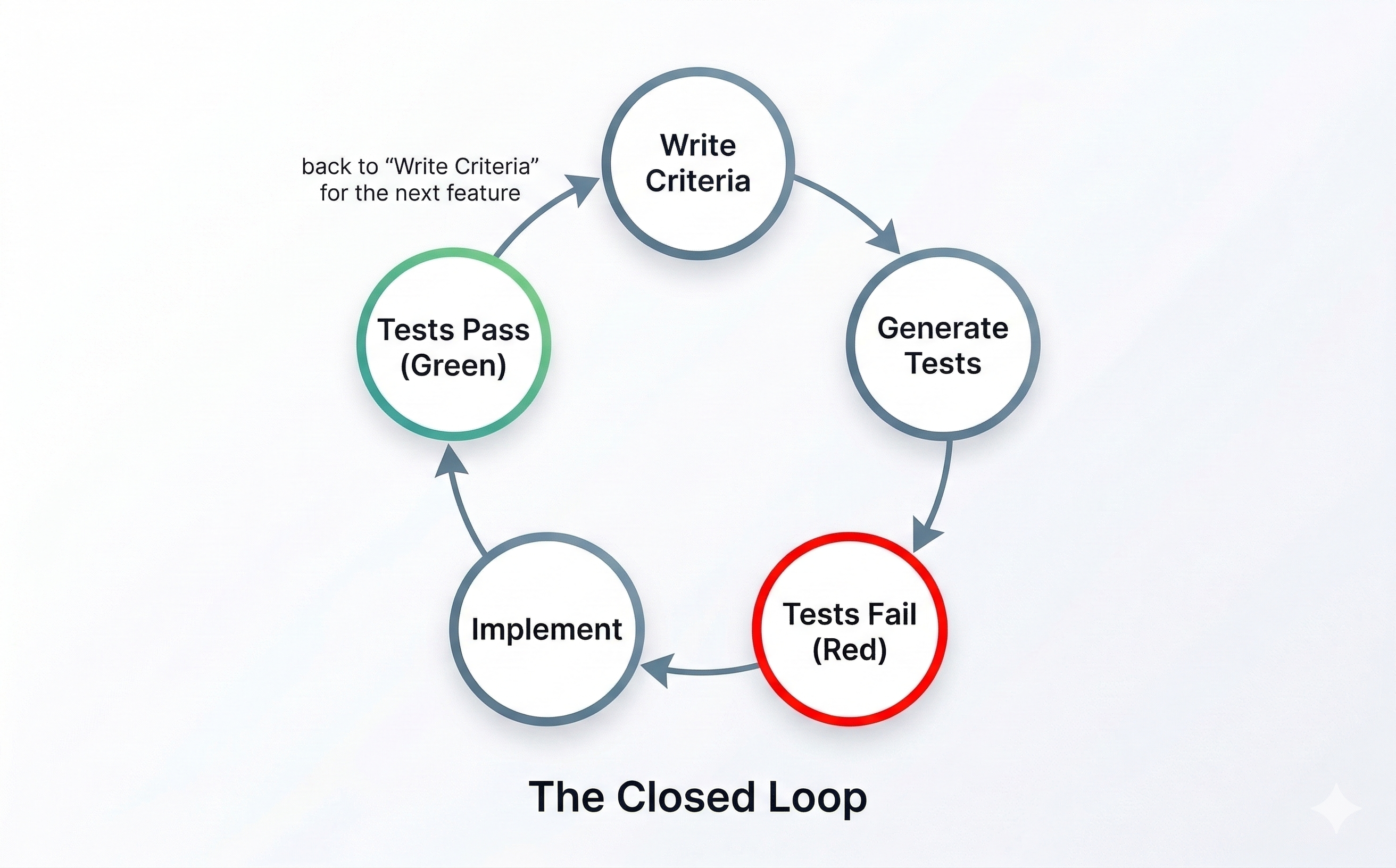
This is the closed loop — criteria drive tests, tests drive implementation, implementation satisfies criteria. The loop closes because the same acceptance criteria that defined "done" also verify "done."
If this pattern sounds familiar to any engineers on your team, it should. This is test-driven development (TDD) — one of the most respected practices in software engineering, originating from Extreme Programming (XP) and agile development methods. The classic rhythm: write the test first, watch it fail (red), write the code to make it pass (green), then clean up. Engineers have practiced this for decades.
What's changed is who does what. In traditional TDD, the developer writes the test AND the code. In your workflow, you write the acceptance criteria, AI writes the test, and AI writes the implementation. The discipline is the same — define success before you build. The difference is that AI handles the translation from criteria to code on both sides. You're practicing real software engineering — with AI as your delegate.
This also explains why tests are the best feedback mechanism for AI. Any objective, deterministic signal — a test that passes or fails, a linter that flags or doesn't — tells AI exactly what to fix. Vague feedback like "make it better" leaves AI guessing. A failing test with a clear error message doesn't. The more specific the signal, the better AI responds.
Here's where the safety net appears: once those tests exist, they run every time. Build a new feature next week? Your existing tests still run. Refactor shared code? Tests catch anything that breaks. That's the difference between a point-in-time check and a permanent record of what "done" means.
Generating Tests from Your Criteria
The pattern is straightforward. Take an acceptance criterion you've already written:
Given I've filled out all required fields, when I click Submit, then my observation appears in the feed with a timestamp and my zone.
Ask your AI coding assistant:
Generate an automated test for this acceptance criterion: Given I've filled out all required fields, when I click Submit, then my observation appears in the feed with a timestamp and my zone. Follow the testing patterns already in the project.
AI generates the test code. You don't need to understand every line of it — you need to verify that the test matches your intent. Ask:
Explain this test in plain English. What does it check? What would make it fail?
If the explanation matches your acceptance criterion, the test is doing its job. If it doesn't, push back — just like you'd push back on any delegate who misunderstood the contract.
The quality of your tests depends on the quality of your criteria. Vague acceptance criteria produce vague tests. Specific criteria produce specific tests. Everything you practiced in Lifts 1 and 2 — the Three Pillars, the Given/When/Then format, tight acceptance criteria — directly determines how good your automated tests are. The skill compounds.
Visual Verification
Automated tests check logic — does the right data appear? Does the form validate? Does the submission reach the feed? But your observation network is a web application that people see and interact with. Some acceptance criteria are fundamentally visual: does the layout look right? Do the correct fields appear when you select an observation type?
Visual verification means checking what users actually see in the browser against your acceptance criteria. There are two approaches:
Your eyes (from Lift 2): Open the app, walk through your acceptance criteria visually, call each one pass or fail. This is the manual review you already know — and it still has a place for layout, design, and user experience checks that are hard to automate.
End-to-end tests: Some tests go beyond checking internal logic — they simulate what a real user does. They open the application, click buttons, fill out forms, and check what appears on screen. AI can generate these from your acceptance criteria just like it generates logic tests:
Generate an end-to-end test for this criterion: Given I'm on the observation form, when I select 'avalanche' as the observation type, then additional fields appear for aspect, elevation band, and avalanche size.
Between automated tests (checking logic), end-to-end tests (simulating user behavior), and your own visual checks (catching what automation misses), your acceptance criteria are covered from every angle.
Here's when to break the pattern: Not everything needs to be automated. If a visual check takes 10 seconds by eye and would take an hour to automate reliably, use your eyes. Automate the checks you'll run repeatedly — especially the ones that protect against regressions. Use manual visual verification for one-time checks, design judgment, and things that are genuinely hard to express as pass/fail criteria.
Team Activity: Generate Your First Tests
Format: Mob Session Time: ~4 minutes Setup: One person drives, everyone else navigates. Do this in the same workspace where you built your Run 2 project.
Take one of the acceptance criteria your team verified manually during Lift 2's review activity, or use this one from your observation network:
Given I've filled out all required fields, when I click Submit, then my observation appears in the feed with a timestamp and my zone.
Step 1: Ask your AI coding assistant to generate a test:
Generate an automated test for this acceptance criterion: Given I've filled out all required fields, when I click Submit, then my observation appears in the feed with a timestamp and my zone. Follow the testing patterns already in the project.
Claude Code will create a test file and write the test code. It reads your project structure to match existing patterns.
Codex will generate the test code in a file that matches your project's existing conventions.
pi.dev will create the test and place it according to your project's test structure.
Step 2: Ask AI to explain the test:
Explain this test in plain English. What's the Given (setup), the When (action), and the Then (check)?
Step 3: Run the tests:
Run the tests.
If the tests fail with errors that seem unrelated to your feature — missing files, timeouts, configuration issues — that's an environment problem, not something you did wrong. Your AI assistant will usually try to fix these automatically. If it doesn't, say: "This error doesn't seem related to my acceptance criterion. Help me fix it." Environment issues are common when first setting up tests.
Discuss: Did the test match your acceptance criterion? If you'd written a vaguer criterion — say, "submitting an observation should work" — how would the generated test be different? What happens to this test when you add a new feature tomorrow?
Save your progress:
Save my progress and sync it.
Team Discussion: Making TDD the Default
Format: Team Discussion Time: ~2 minutes
You just experienced the TDD cycle once: write criteria, generate a failing test, implement until it passes. But right now, you had to walk your AI coding assistant through each step manually. In Run 3, you'll have a whole backlog of stories to work through.
Discuss these questions in order:
-
If you handed your AI coding assistant a new user story right now, would it automatically follow the TDD cycle — writing a failing test first, then implementing, then verifying? Or would it jump straight to building?
-
You've learned two tools for shaping how AI works: project context files (Lift 1) and skills (Lift 2). How could you use one of those to make the TDD cycle the default behavior — so your AI coding assistant follows red → green every time you give it a new story, without you having to spell out the steps?
-
What would you put in that instruction? Think about the steps you just practiced.
Now do it. Before you leave this section, add the instruction to your project context file. Ask your AI coding assistant:
Add this to our project context file: When implementing a user story, always write a failing test from the acceptance criteria first, then implement until the test passes, then run the full test suite to check for regressions. This takes 30 seconds and ensures your AI assistant follows the TDD cycle automatically in Run 3.
Save your progress:
Save my progress and sync it.
Key Insight
The closed loop — criteria → tests → fail → implement → pass — turns your acceptance criteria into a permanent safety net. Tests don't just verify once; they verify every time. AI generates the test code from criteria you already wrote. You don't need to understand test code — you need to verify that the test matches your intent. Visual verification and end-to-end tests extend the same pattern to what users see. Together, they replace "I checked it manually" with "tests check it automatically, every time."