Your Workflow for the Day
Explore, Plan, Implement, Verify
You now know how to write good prompts and how AI behaves. The last piece is a simple workflow that keeps you on track — especially when you're building something bigger than a single prompt can handle.
Every time you work with AI, follow these four steps:
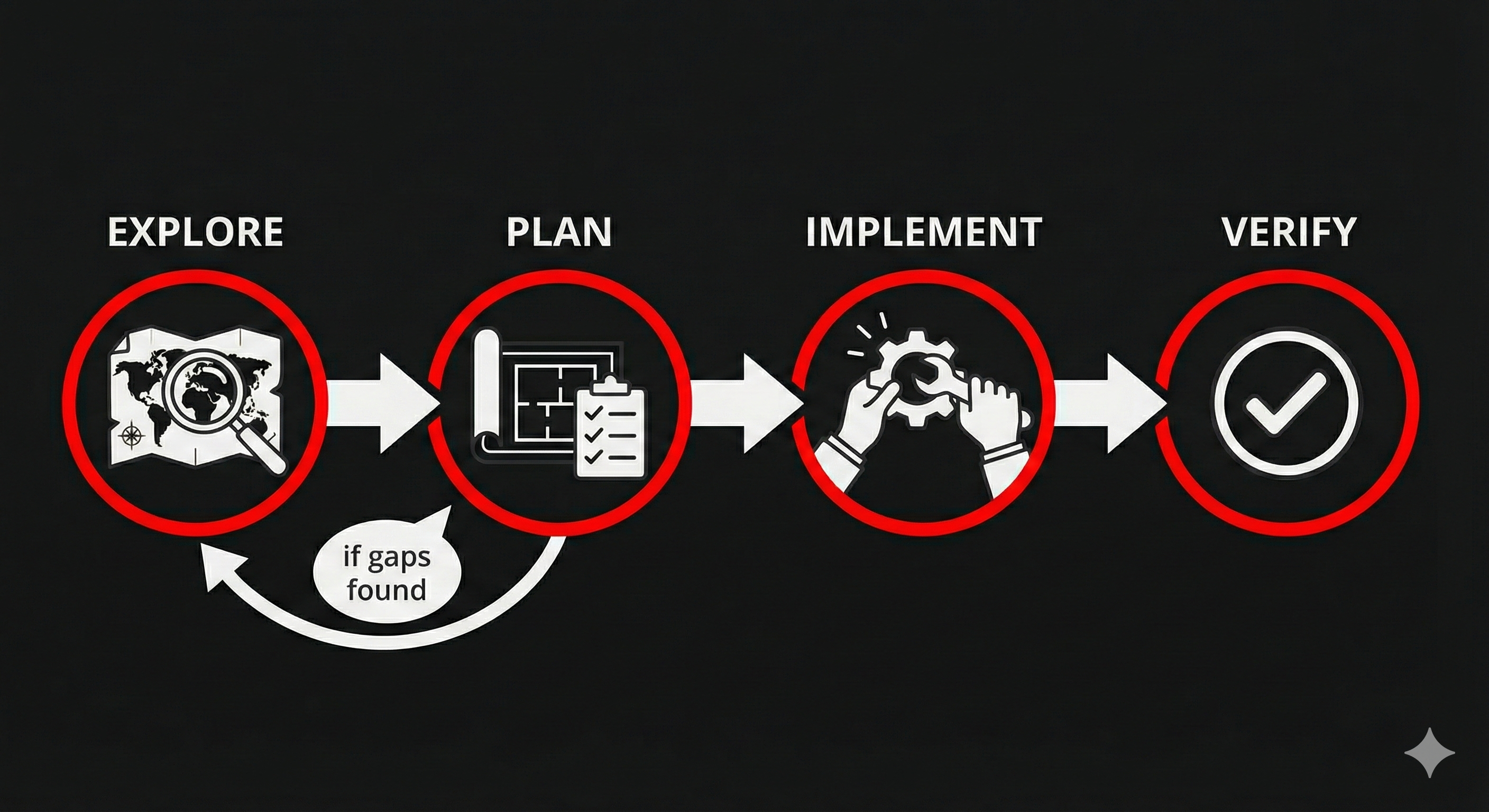
1. Explore
Before you start building, understand who you're building for. What do your users need? What problems are they trying to solve? What would make their life easier? This is the discovery step — you're building enough empathy with your user that you could write a story from their perspective.
You can use AI to help with this exploration:
What does a backcountry skier need to know before heading into avalanche terrain? What decisions are they making, and what information would help them make safer choices?
2. Plan
Describe what you want to build as a user story with acceptance criteria. This is where the story format from the last section pays off — your story IS your plan.
As a backcountry skier, I want an interactive danger scale page so that I can quickly see today's risk level.
Given the danger level is 'Considerable,' when I view the page, then I see an orange indicator with the level name and travel advice. Given there are 5 levels, when I view the page, then all 5 are displayed with their correct colors (green, yellow, orange, red, black).
3. Implement
Tell AI to go ahead and build it. You can send the whole story as your prompt — AI will use both the story and the acceptance criteria to guide what it builds.
Build this as clean, mobile-friendly HTML.
4. Verify
Walk through each acceptance criterion. Pass or fail — no guessing.
- Five levels displayed? Check.
- Correct colors for each? Check.
- Travel advice for Considerable? Check.
- Missing something? Tell AI exactly which criterion failed: "The Considerable level is showing yellow instead of orange. Fix the color to match the danger scale."
Then the cycle repeats. Verify reveals a new thing to fix → you plan it → AI implements → you verify again. The acceptance criteria you wrote in Step 2 are the same checklist you use in Step 4.
Right-Sizing Your Prompts
Not everything needs a four-step process. Match the complexity of your prompt to the complexity of the task.
- Small ask → just say it in plain English: "Change the background color to light blue"
- Medium ask → write a user story with acceptance criteria: "As a skier, I want a gear checklist so that I don't forget critical safety equipment. Given the list has 8 items, when I view it, then items are organized by category (navigation, safety, emergency) with checkboxes."
- Big ask → break it into smaller stories first, then use the workflow for each one
You'll develop a feel for this as the day goes on. When in doubt, write a story — if the acceptance criteria keep growing and you can't list them all, that's your signal to break the task into smaller pieces.
Team Activity: Your First Cycle Together
Format: Mob Session Time: ~5 minutes Setup: Gather around one person's screen. That person is the "driver" — the only one typing. Everyone else is navigating (giving directions).
Start a new conversation in your AI chat tool, then walk through one complete Explore → Plan → Implement → Verify cycle together:
- Explore (30 sec): Ask AI — "What does a backcountry skier need to know before heading into avalanche terrain? What are their biggest concerns?"
- Plan (1.5 min): As a team, pick one thing from AI's answer (maybe a danger rating display, or a gear checklist, or a decision flowchart). Write a quick user story with 1-2 acceptance criteria.
- Implement (1 min): The driver sends the story as the prompt. Watch what AI creates.
- Verify (1 min): Walk through each acceptance criterion. Pass or fail?
Discuss: How did verifying against acceptance criteria compare to just eyeballing it? Did writing the criteria first help you spot what was missing or wrong?
The driver opens claude.ai. Share the screen so the whole team can see the conversation.
The driver opens chatgpt.com. Share the screen so the whole team can see the conversation.
Key Insight
AI makes building easy. Knowing what to build is the hard part — and the part that matters. Explore → Plan → Implement → Verify keeps you focused on the outcome, not just the output. Without Explore and Plan, you'll generate something fast that nobody needs. With them, you build something that actually solves a real problem for a real person. That's the difference between producing software and producing impact.